Import flow traces via Azure Data Factory pipelines
For the Invictus Dashboard to know if messages went through your Azure Data Factory pipelines correctly or not, you need to configure diagnostic settings on all pipelines you want to include. These settings should stream their diagnostic traces to the Invictus Event Hubs resource:
EventHubsNamespace:invictus-{env}-we-sft-evnmEventHubsName:invictus-{env}-we-sft-df-evhb
warning
⚠️ Make sure that the following categories are checked:
- ✅
PipelineRuns - ✅
TriggerRuns - ✅
ActivityRuns
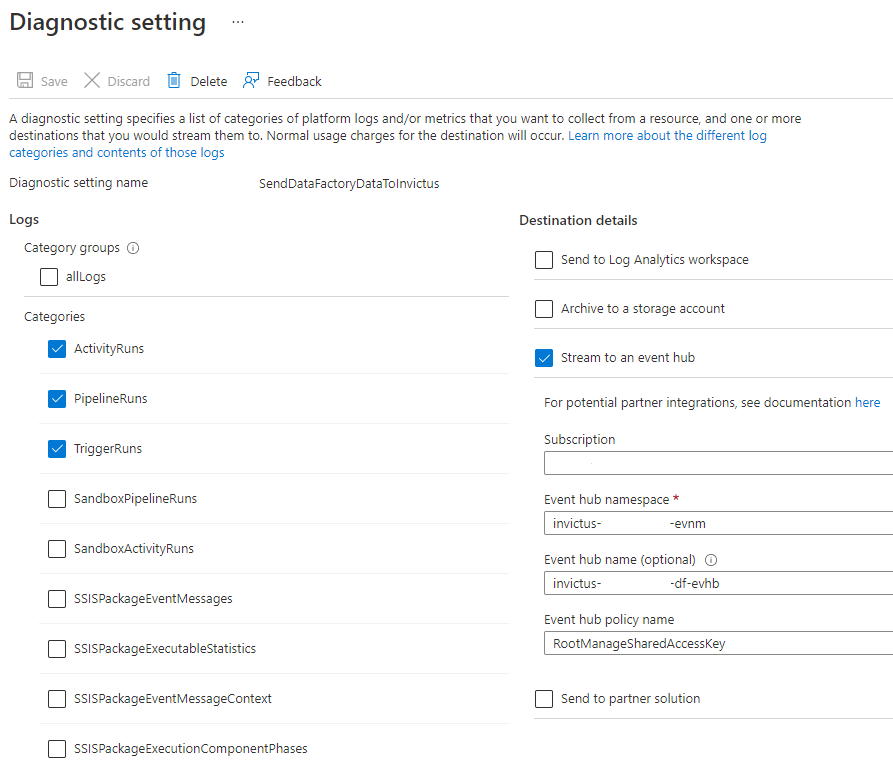
See Microsoft's documentation on how you can configure this manually.
You can also update your Bicep template to include them:
resource factoryName_microsoft_insights_settingName 'Microsoft.DataFactory/factories/providers/diagnosticSettings@2017-05-01-preview' = {
  name: '${factoryName}/microsoft.insights/${settingName}'
  location: resourceGroup().location,
  properties: {
    workspaceId: null,
    storageAccountId: null
    eventHubAuthorizationRuleId: 'RootManageSharedAccessKey',
    eventHubName: 'invictus-{env}-we-sft-df-evhb',
    logs: [
      {
        category: 'PipelineRuns'
        enabled: true,
        retentionPolicy: {
          enabled: false,
          days: 0
        }
      }
      {
        category: 'TriggerRuns'
        enabled: true,
        retentionPolicy: {
          enabled: false,
          days: 0
        }
      }
      {
        category: 'ActivityRuns'
        enabled: true,
        retentionPolicy: {
          enabled: false,
          days: 0
        }
      }
    ]
  }
  dependsOn: [
    datafactory
  ]
}